


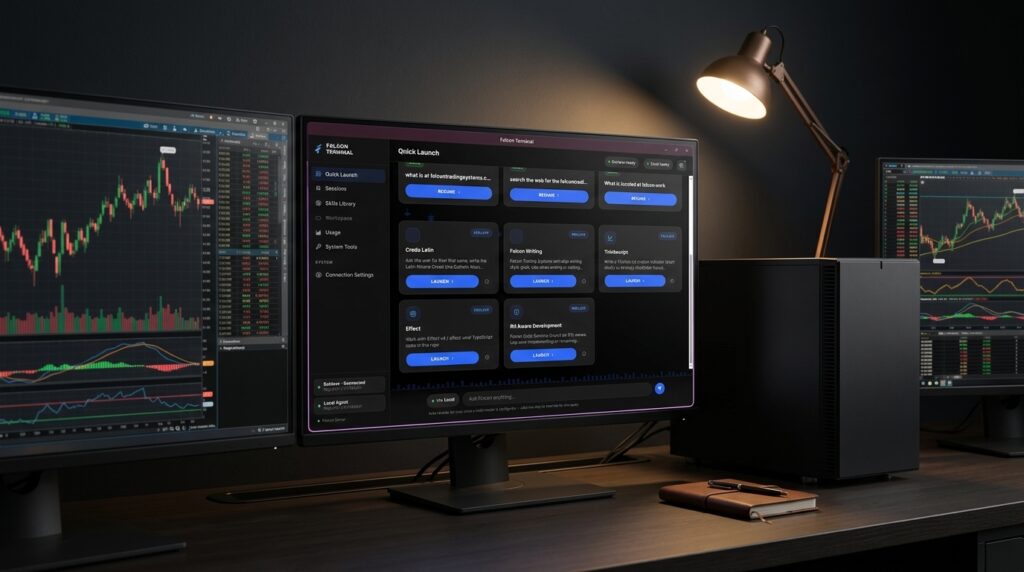
Anyone can install an open-source AI shell on a fast PC and spend a weekend figuring out how to use it. Falcon Terminal is not that. It is software we wrote ourselves, pre-installed on every AI Desk and AI Book, with the tools traders actually need already built in and already working the day the machine arrives.
There is no prompt-writing to learn and no command line to touch. You open a tool, hand it a file, and get an answer, on hardware that never sends what you handed it anywhere else unless told to.
The tools built in
Review your trade journal
Hand it your fill history and it finds the patterns you cannot see in your own logs: the setups you cut short, the hours you lose money, what tends to happen the day after a loss. The journal is never uploaded. It is read on the machine it is already sitting on.
Read your broker statement
Drop in a statement and it reads back your real concentration, your correlated positions, and what a bad week in one sector would do to the whole account. A broker statement is one of the most sensitive files a trader owns, and it never leaves the desk.
Write your indicator
Falcon Terminal drafts and debugs Pine Script, NinjaScript, and thinkScript. It flags the parts it is not confident about rather than handing back code that looks finished and is not. Your unpublished strategy stays exactly that: unpublished. This tool benefits from more AI memory (16GB or better) than the lighter tasks above, since writing correct code takes more careful reasoning than summarizing a document.
Check a trade against your own rules
Save your own rules, risk per trade, a daily drawdown cap, whatever has to line up before you take a position, and walk a trade through them before you enter. The rules are yours, saved on your own machine, not standardized across every user of some SaaS product.
Search your own documents
Point it at a folder, prop-firm rulebooks, platform manuals, your own notes, and ask questions against it. Answers cite what they came from. The folder is indexed locally and never uploaded.
Look something up online
This is the one tool that reaches the internet, because it has to. Switch it on and only the lookup itself goes out: a ticker, a headline search. The thinking still happens on your machine. It ships off by default, and stays off until you turn it on.
The privacy toggle, exactly
Falcon Terminal runs entirely on your machine and needs no connection to answer a question. You can unplug the network cable and it keeps working.
Two features can reach out, and both ship switched off: pulling a model update, and the research lookup described above. They are controlled by one toggle inside Falcon Terminal, named plainly in the app rather than buried in a settings menu, and neither one sends your files or chat history anywhere. If you would rather that be enforced in hardware than trusted to software, ask us to block the AI’s network access at the firewall before your machine ships.
What it does when you are not trading
Everything above is built and tuned for trading. Underneath it, though, is a full, general-purpose AI assistant, the same kind of thing you would open a browser tab for today. Draft an email, summarize a document, explain a concept, work through a problem out loud. Same window, no account, no monthly bill, and nothing you type goes anywhere. Most owners end up using it for that about as often as for the trading tools.
What it will not do
Falcon Terminal analyzes and explains. It does not tell you what to trade. These tools help you understand your own history, your own risk, your own code, and your own statements. They do not produce buy or sell calls, and anything that could touch an order stays in simulation until you confirm it yourself, every time. It is the same line every brokerage draws, and it is the right one to draw.
FAQ
Do I need to know anything technical to use it?
No. Falcon Terminal arrives installed, tuned to your specific machine, and loaded with the models selected for it. You open it, click the tool you want, and hand it a file. There is no command line, no account to create, and nothing to configure.
Can Falcon Terminal place trades for me?
No. It analyzes, explains, and reviews. Anything that could touch an order stays in simulation until you confirm it, and it never submits anything on its own.
Will running Falcon Terminal slow down my charts?
On an AI Desk, no. Your monitors are driven by graphics hardware that does nothing else, and the AI runs on separate hardware that is never asked to draw anything, so there is nothing shared to contend over. An AI Book has one graphics chip doing both jobs, which is fine for a question here and there and is exactly why pairing a Book with a Falcon AI Enclave removes the problem entirely.
What happens when a better model comes out?
You load it, if you want it. New models come out constantly and run on the same hardware. We evaluate the ones worth caring about against the work traders actually do, and release the ones that earn a place on your machine. Nothing installs itself, and nothing changes underneath you.
Is Falcon Terminal as good as ChatGPT or Claude?
No, and we are not going to pretend otherwise. The frontier cloud models are ahead of anything that runs on a desk, and they will stay ahead. What runs in Falcon Terminal is capable enough for the work that matters most to a trader: reviewing a year of trades, explaining a spread, drafting an indicator, reading a statement back in plain English, on files you would think twice about uploading anywhere else. —
See Which Machine Runs It Best
Or call 1-800-557-7142 (a real conversation with a technician, not a form).

